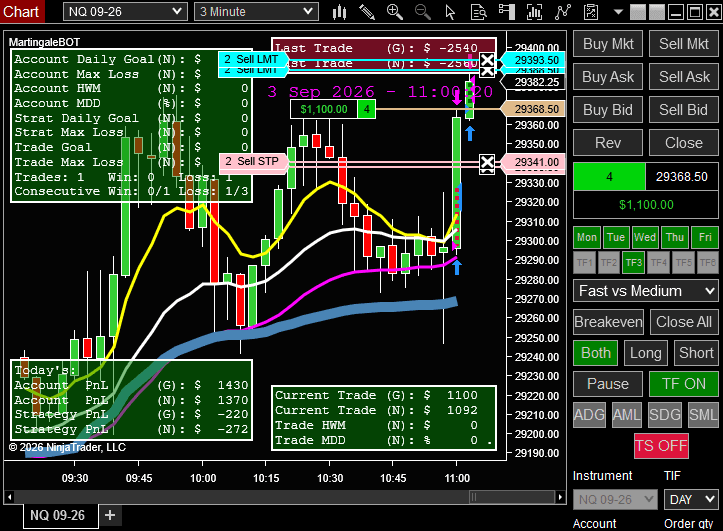
MartingaleBOT®
Product information
Version 1.0 (Updated )
MartingaleBOT® combines moving average crossover entries with martingale position sizing — a method that doubles (or otherwise increases) position size after a losing trade so that the next winning trade can recover the losses of the previous loss (or sequence of losses) and close it with a neutral result. You decide in advance how far a sequence can go: the progression, the maximum number of trades, and therefore the most contracts and the largest loss you are prepared to accept. When that limit is reached, MartingaleBOT® stops trading.
Highlights
- Martingale Position Sizing: Doubles contracts after each losing trade (e.g. 1:2:4), or follows your own custom progression (e.g. 1:2:3).
- Defined Sequence Limits: Cap the number of trades per sequence so your worst case is known before the first entry.
- MA Crossover Entries: Fast, Medium and Slow EMA/SMA with a selectable crossover pair, plus optional VWAP, Squeeze and Higher Time Frame filters.
- Layered Risk Controls: Account and strategy daily goals and max loss, profit protection with max drawdown from high water mark, breakeven and trailing stops.
Additional Information
How a Martingale Sequence Works
When the selected moving averages cross, MartingaleBOT® enters a trade. If the first trade is a winner, the strategy stops for the remainder of the day. If the first trade loses, the number of contracts for the next entry is larger — doubled by default, or sized by your custom progression. After a loss, when a subsequent trade wins, the strategy stops for the rest of the day. With a 1:2:4 progression, for example, the largest position (the third entry) is 4x the original contract size and the sequence ends.
You Set the Worst Case
The Number of Trades Before Stopping setting caps every sequence. If all trades in a sequence lose, MartingaleBOT® stops instead of increasing size again, so the maximum exposure of a sequence is set by you, not by the market. Stop orders are not guaranteed to execute at the specified price due to potential slippage (positive or negative).
Entries and Exits Your Way
Choose Fast vs Medium, Fast vs Slow or Medium vs Slow crossovers. Set targets and stops in ticks or as ATR multiples, or assign up to three NinjaTrader ATM templates — one per entry level. Filter entries by VWAP, Squeeze, Higher Time Frame trend, day of the week and up to six Time Filters.
Risk Controls at Every Level
Account Daily Goal and Account Max Loss, Strategy Daily Goal and Strategy Max Loss, per-trade goal and max loss, profit protection (max drawdown from high water mark), breakeven, trailing stop and a daily time to go flat.
Adjust It While It Runs
Chart Trader buttons let you switch the MA pair and direction, pause, turn Time Filters and the Trailing Stop on or off, toggle ADG, AML, SDG and SML, move to Breakeven or close all — without restarting the strategy.
Understand the Risk Before You Trade
Martingale is a position sizing method, not a trading edge: it does not make an unprofitable strategy profitable. Because size increases after each loss, a full losing sequence costs considerably more than a single trade. Size your account for the complete sequence, and test your settings on a simulation account first.
Frequently Asked Questions
After a losing trade, the next trade is larger, so that one winning trade can recover the losses of the sequence and close it with a positive result. MartingaleBOT® doubles size by default, or follows a custom progression you define.
No. Martingale does not create a statistical edge on its own — results depend on the entries it is applied to. A sequence can end with every trade losing, which is why MartingaleBOT® lets you cap the number of trades and stops when that limit is reached.
Set Number of Trades Before Stopping and your progression to define the largest position and the most a sequence can lose. Add Account or Strategy Max Loss, a per-trade max loss, and time filters for further protection. Always test on a simulation account first.
Yes. You can assign up to three ATM templates — the first is used for the first entry, the second for the second, and so on. Each template should follow your martingale progression.
MartingaleBOT® is built for NinjaTrader 8 and installs as a NinjaScript Add-On.